
Distractions to Design
Distractions to Design
Distractions to Design
The Process of Gamifying Hobbies for ADHD
The Process of Gamifying Hobbies for ADHD
Study Buddy: an app where the user can gamify everyday needs through a virtual pet. When you sleep, play, and eat, your pet does the same!
Study Buddy: an app where the user can gamify everyday needs through a virtual pet. When you sleep, play, and eat, your pet does the same!
Study Buddy: an app where the user can gamify everyday needs through a virtual pet. When you sleep, play, and eat, your pet does the same!
Timeline
Two Months
Services
Visual Design UI & UX Design
Tools
Figma
Adobe Illustrator
Adobe Photoshop
Miro
Date
January 2026
Everyday habits can become a chore for many, especially for a student. This can be to the point where even basic necessities such as eating and sleeping become less of a priority. I developed "Study Buddy" to help fight that problem: by making sure a virtual pet was being fed and taken care of, the user would do the same.
Everyday habits can become a chore for many, especially for a student. This can be to the point where even basic necessities such as eating and sleeping become less of a priority. I developed "Study Buddy" to help fight that problem: by making sure a virtual pet was being fed and taken care of, the user would do the same.
Everyday habits can become a chore for many, especially for a student. This can be to the point where even basic necessities such as eating and sleeping become less of a priority. I developed "Study Buddy" to help fight that problem: by making sure a virtual pet was being fed and taken care of, the user would do the same.
Challenge
Challenge
Challenge
College students face difficulty staying focused on coursework because frequent phone distractions and a lack of motivation make it challenging to maintain attention and complete tasks without interruption.
Goal
Goal
Develop an interactive pet simulation app where the user takes care of a pet while also connecting with other students in their respective colleges to study together.




Understanding The Users and Market
Understanding The Users and Market
Understanding The Users and Market
Daily Habits and difficulties keeping on track
I asked 12 users, all students ranging from 18-30, What they found difficult in their daily life and what they would like to improve upon while studying. I also asked users who have played pet simulators what their difficulties were when it came to different pet simulations.
Daily Habits and difficulties keeping on track
I asked 12 users, all students ranging from 18-30, What they found difficult in their daily life and what they would like to improve upon while studying. I also asked users who have played pet simulators what their difficulties were when it came to different pet simulations.
Daily Habits and difficulties keeping on track
I asked 12 users, all students ranging from 18-30, What they found difficult in their daily life and what they would like to improve upon while studying. I also asked users who have played pet simulators what their difficulties were when it came to different pet simulations.


What Do The Competitors Do Right?
What Do The Competitors Do Right?
What Do The Competitors Do Right?
While apps that gamify focus methods and pet simulation apps do exist, none combine both of them. Study Buddy emphasizes on taking care of your pet by focusing, but also by taking care of yourself.
Many focus apps also solely use the pomodoro method with no other additions. With this in mind, I want to add this into Study Buddy, but also understand the need for accommodations like preplotting the study times.
While apps that gamify focus methods and pet simulation apps do exist, none combine both of them. Study Buddy emphasizes on taking care of your pet by focusing, but also by taking care of yourself.
Many focus apps also solely use the pomodoro method with no other additions. With this in mind, I want to add this into Study Buddy, but also understand the need for accommodations like preplotting the study times.
Translating To Screens
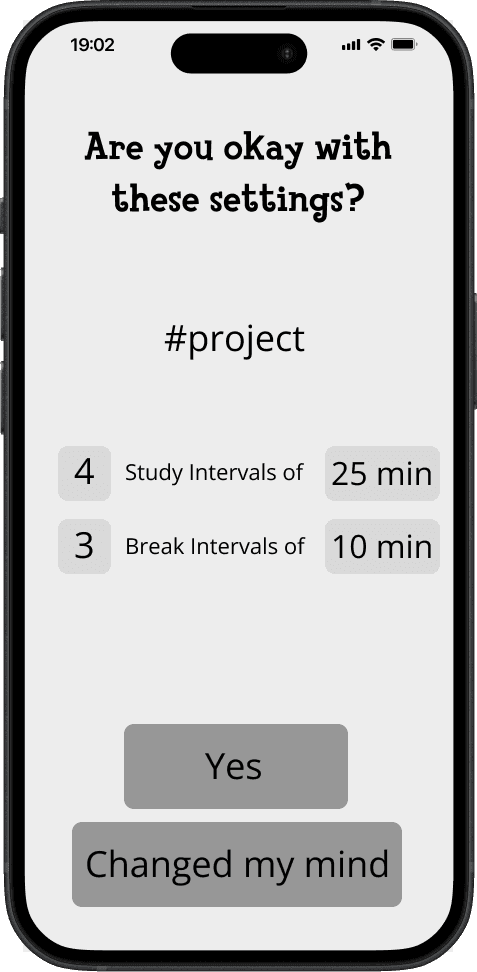
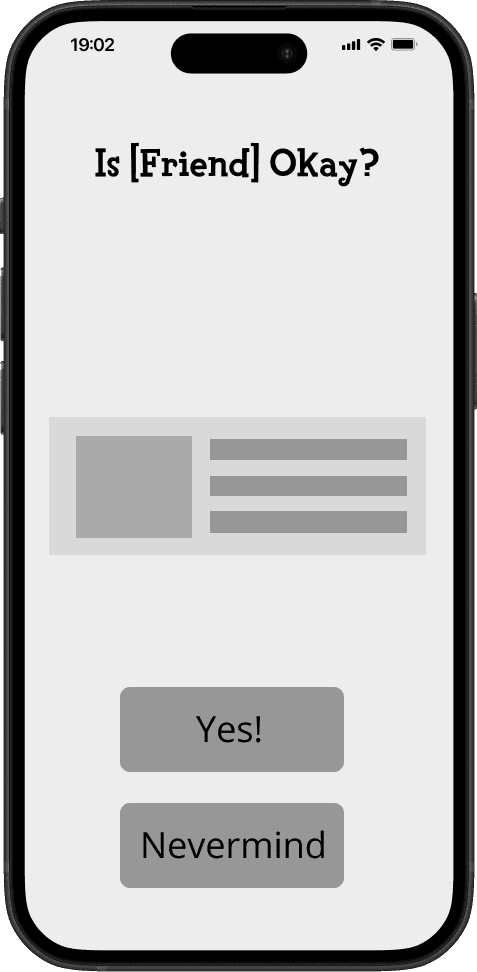
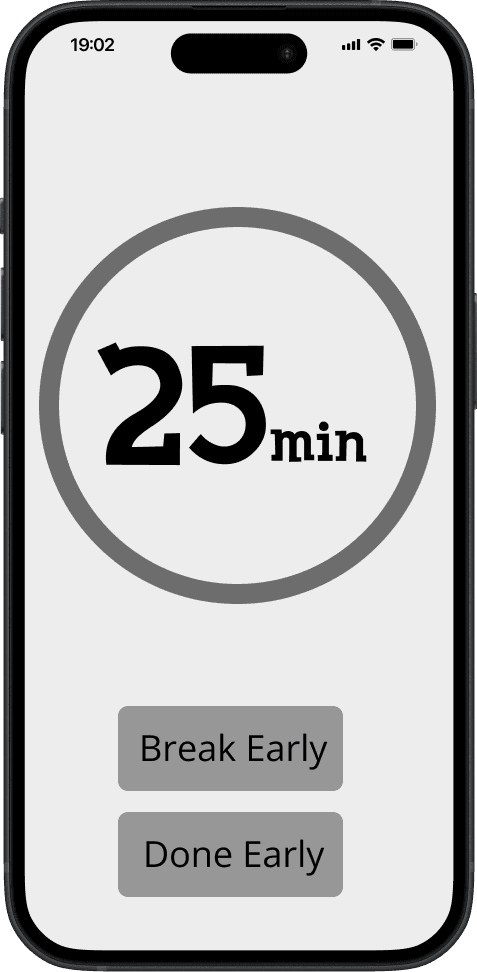
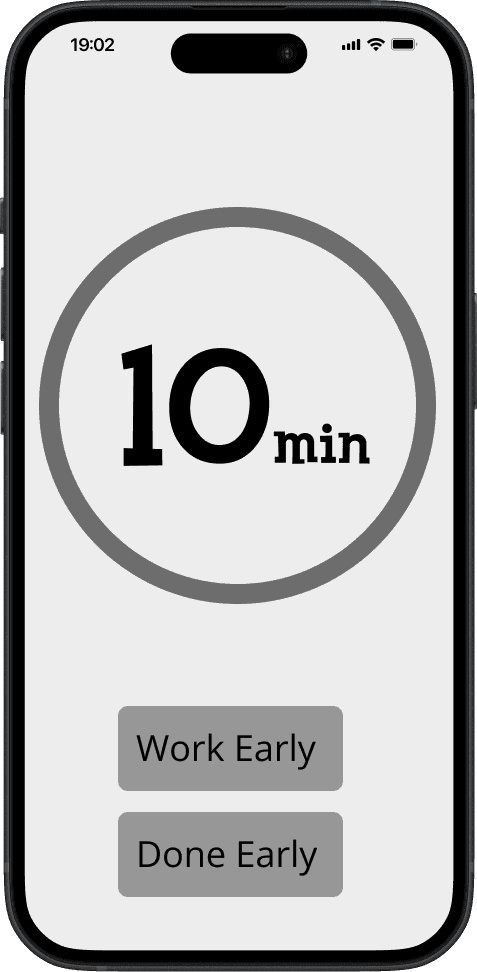
I then created low-fidelity wireframes to understand the basic structure and layout of the app. I wanted to make sure everything would work smoothly before going deep into designing. My primary goal was to make sure the key interactions of the app ensure a smooth and intuitive user experience.
Delving Into Aesthetics
I wanted to delve into the aesthetic I was going for in my wireframes: bright, inviting colors with a quirky font and hand drawn UI elements to stand out from the competition.
Identifying Behavioral Patterns
Prioritizing Ease of Access Through a Site Map
My first thoughts were: What do I want the to app to have? What did I want the user to see first? Creating a site map of what Study Buddy Would be helped me move forward to my user flow.
Identifying Behavioral Patterns
Prioritizing Ease of Access Through a Site Map
My first thoughts were: What do I want the to app to have? What did I want the user to see first? Creating a site map of what Study Buddy Would be helped me move forward to my user flow.
Identifying Behavioral Patterns
Prioritizing Ease of Access Through a Site Map
My first thoughts were: What do I want the app to have? What did I want the user to see first? Creating a site map of what Study Buddy Would be helped me move forward to my user flow

Strategizing Human Behaviors
To make sure the app moves smoothly, I carefully crafted user flows to map out the user journey. I would ask myself questions like: “How can we get from A to B as quickly as possible without making the user wait?
This exercise was incredibly valuable as it allowed me to visualize how users would navigate and how difficult it would be to interact with the app.
Strategizing Human Behaviors
To make sure the app moves smoothly, I carefully crafted user flows to map out the user journey. I would ask myself questions like: “How can we get from A to B as quickly as possible without making the user wait?
This exercise was incredibly valuable as it allowed me to visualize how users would navigate and how difficult it would be to interact with the app.
Strategizing Human Behaviors
To make sure the app moves smoothly, I carefully crafted user flows to map out the user journey. I would ask myself questions like: “How can we get from A to B as quickly as possible without making the user wait?
This exercise was incredibly valuable as it allowed me to visualize how users would navigate and how difficult it would be to interact with the app.

Designing With Behavior In Mind
Designing With Behavior In Mind
Designing With Behavior In Mind
Early Game Concepts
Referencing aesthetics from games such as Animal Crossing and Tamagotchi, I wanted to design each animal to have their own personality so users can have a variety of options to choose from.
Early Game Concepts
Referencing aesthetics from games such as Animal Crossing and Tamagotchi, I wanted to design each animal to have their own personality so users can have a variety of options to choose from.
Early Game Concepts
Referencing aesthetics from games such as Animal Crossing and Tamagotchi, I wanted to design each animal to have their own personality so users can have a variety of options to choose from.


Translating to Screens
I then created low-fidelity wireframes to understand the basic structure and layout of the app. I wanted to make sure everything would work smoothly before going deep into designing. My primary goal was to make sure the key interactions of the app ensure a smooth and intuitive user experience
Translating to Screens
I then created low-fidelity wireframes to understand the basic structure and layout of the app. I wanted to make sure everything would work smoothly before going deep into designing. My primary goal was to make sure the key interactions of the app ensure a smooth and intuitive user experience






Delving Into Aesthetics
I wanted to delve into the aesthetic I was going for in my wireframes: bright, inviting colors with a quirky font and hand drawn UI elements to stand out from the competition.
Delving Into Aesthetics
I wanted to delve into the aesthetic I was going for in my wireframes: bright, inviting colors with a quirky font and hand drawn UI elements to stand out from the competition.

Inquiring About an Animal
After logging in, the user is able to start an inquiry about any animal of their choice before adopting them.
Petbound lets the user browse through different animals and inquire to their respective shelter about any information not present in the pet’s bio. Petbound sends a transcript of the inquiry to the email connected to the user’s account.
Browsing for Games/Saving into Your Library
After logging in, the user can browse games located in 16-Bit Arcade and add them to their library to look at later.
The games are separated into genres, and have information of where exactly each game is located: as well as price, languages, a summary, and a trailer.
Inquiring About an Animal
After logging in, the user is able to start an inquiry about any animal of their choice before adopting them.
Petbound lets the user browse through different animals and inquire to their respective shelter about any information not present in the pet’s bio. Petbound sends a transcript of the inquiry to the email connected to the user’s account.
Browsing for Games/Saving into Your Library
After logging in, the user can browse games located in 16-Bit Arcade and add them to their library to look at later. The games are separated into genres, and have information of where exactly each game is located: as well as price, languages, a summary, and a trailer.
Inquiring About an Animal
After logging in, the user is able to start an inquiry about any animal of their choice before adopting them.
Petbound lets the user browse through different animals and inquire to their respective shelter about any information not present in the pet’s bio. Petbound sends a transcript of the inquiry to the email connected to the user’s account.
Browsing for Games/Saving into Your Library
After logging in, the user can browse games located in 16-Bit Arcade and add them to their library to look at later. The games are separated into genres, and have information of where exactly each game is located: as well as price, languages, a summary, and a trailer.
The First Prototype
The First Prototype
The First Prototype




From Design To Human Testing
From Design To Human Testing
From Design To Human Testing
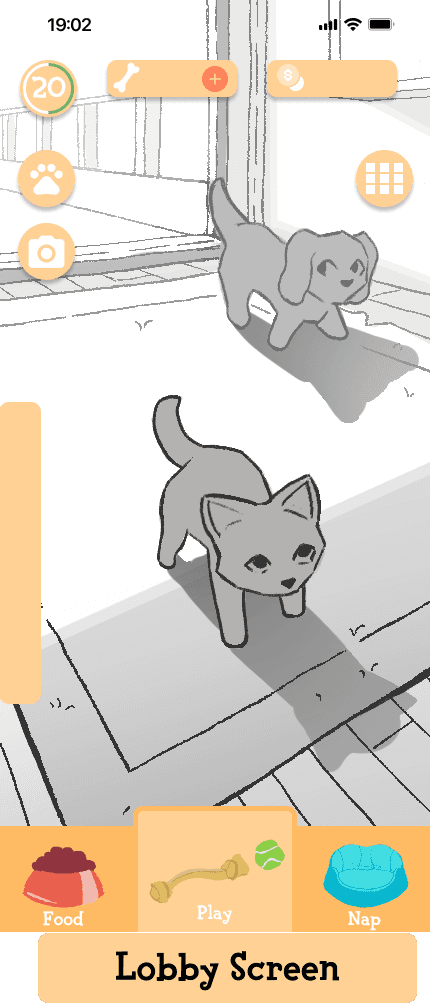
I used the prototype to conduct moderated usability tests with 8 users: All users had to go through the feed, play and nap process.
I wanted to evaluate not only how users would go through each task, but uncover any problems they may face.
The results for the test is that all users found Study Buddy to be fairly easy to navigate. However, there were a few clarification problems to address, alongside some minor issues.
I used the prototype to conduct moderated usability tests with 8 users: All users had to go through the feed, play and nap process.
I wanted to evaluate not only how users would go through each task, but uncover any problems they may face.
The results for the test is that all users found Study Buddy to be fairly easy to navigate. However, there were a few clarification problems to address, alongside some minor issues.

Iteration 1:
Almost all users were confused about what the buttons on the top screen were meant for. They didn’t like how cluttered the screen looked, and they also didn't understand the purpose of pressing the tab in the middle.
Solution:
I made sure to label the tab and clear out any buttons that weren’t needed on the home screen to make the app easier to understand at first glance.

Iteration 2:
At first appearance, users don't recognize the 'save state' screen. Rather, they presumed the screen meant 'adopting' a pet. This caused confusion since they were promised initially to pick an animal at a different time.
Solution:
I made the starting screen clearly indicate that users are picking a save file, not adopting a pet

Iterations
Iterations
Iterations
Iteration 1:
Almost all users were confused about what the buttons on the top screen were meant for. They didn’t like how cluttered the screen looked, and they also didn't understand the purpose of pressing the tab in the middle.
Solution:
I made sure to label the tab and clear out any buttons that weren’t needed on the home screen to make the app easier to understand at first glance.
Iteration 2:
At first appearance, users don't recognize the 'save state' screen. Rather, they presumed the screen meant 'adopting' a pet. This caused confusion since they were promised initially to pick an animal at a different time.
Solution:
I made the starting screen clearly indicate that users are picking a save file, not adopting a pet.

Iteration 3:
Some users were confused about what “taking a break” and “ending work” meant. Many of them assumed they had the same effect and ended up in a loop. This caused enough confusion that they assumed the prototype was glitched.
Solution:
I clarified the wording on both buttons, so users can understand which button did what action.
Iterations To Screen
Iterations To Screen
Iterations To Screen
Feed Yourself and Your Pet
When you eat, you can feed your pet at the same time. Set a timer for the length of your meal. As the timer runs, your pet’s hunger meter will increase. Longer meals result in a fuller pet.
Sweet Dreams
Before going to bed, put your pet to sleep with you. Select the Nap option and choose the number of hours your pet should sleep. Your pet will rest for the selected time.
Time to Play
If you are going out or need time to study, take your pet with you. Choose an activity that fits your schedule, add breaks if needed, and allow your pet to play with a friend while you are busy.
Feed Yourself and Your Pet
When you eat, you can feed your pet at the same time. Set a timer for the length of your meal. As the timer runs, your pet’s hunger meter will increase. Longer meals result in a fuller pet.
Sweet Dreams
Before going to bed, put your pet to sleep with you. Select the Nap option and choose the number of hours your pet should sleep. Your pet will rest for the selected time.
Time to Play
If you are going out or need time to study, take your pet with you. Choose an activity that fits your schedule, add breaks if needed, and allow your pet to play with a friend while you are busy.
Takeaways
This project was a huge undertaking: from interviews, researching aesthetics and similar apps, to creating the UI, Study Buddy was an enlightening experience. The project expanded on what I should do in the future and what I can do to enhance the quality of my work.
Overall, I learned that there’s always more to do, and that sometimes it’s alright to keep a project as is and use that knowledge to create even better projects. I want to push myself even more creatively and deliver exceptional user experiences in future projects.
Takeaways
This project was a huge undertaking: from interviews, researching aesthetics and similar apps, to creating the UI, Study Buddy was an enlightening experience. The project expanded on what I should do in the future and what I can do to enhance the quality of my work.
Overall, I learned that there’s always more to do, and that sometimes it’s alright to keep a project as is and use that knowledge to create even better projects. I want to push myself even more creatively and deliver exceptional user experiences in future projects.
Takeaways
This project was a huge undertaking: from interviews, researching aesthetics and similar apps, to creating the UI, Study Buddy was an enlightening experience. The project expanded on what I should do in the future and what I can do to enhance the quality of my work.
Overall, I learned that there’s always more to do, and that sometimes it’s alright to keep a project as is and use that knowledge to create even better projects. I want to push myself even more creatively and deliver exceptional user experiences in future projects.
Feed Yourself and Your Pet
When you eat, you can feed your pet at the same time. Set a timer for the length of your meal. As the timer runs, your pet’s hunger meter will increase. Longer meals result in a fuller pet.
Sweet Dreams
Before going to bed, put your pet to sleep with you. Select the Nap option and choose the number of hours your pet should sleep. Your pet will rest for the selected time.
Time to Play
If you are going out or need time to study, take your pet with you. Choose an activity that fits your schedule, add breaks if needed, and allow your pet to play with a friend while you are busy.
Iteration 1:
Almost all users were confused about what the buttons on the top screen were used for. They didn’t like how cluttered the screen looked, and they also didn't understand the purpose of pressing the tab in the middle.
Solution:
I made sure to label the tab and clear out any buttons that weren’t needed on the home screen to make the app easier to understand at first glance.
Iteration 2:
At first appearance, users don't recognize the 'save state' screen. Rather, they presumed the screen meant 'adopting' a pet. This caused confusion since they were promised initially to pick an animal at a different time.
Solution:
I made the starting screen clearly indicate that users are picking a save file, not adopting a pet

Iteration 3:
Some users were confused about what “taking a break” and “ending work” meant. Many of them assumed they had the same effect and ended up in a loop. This caused enough confusion that they assumed the prototype was glitched.
Solution:
I clarified the wording on both buttons, so users can understand which button did what action.
Iteration 3:
Some users were confused about what “taking a break” and “ending work” meant. Many of them assumed they had the same effect and ended up in a loop. This caused enough confusion that they assumed the prototype was glitched.
Solution:
I clarified the wording on both buttons, so users can understand which button did what action.