
Turning Curiosity into Play
Turning Curiosity into Play
Turning Curiosity into Play
Designing a Preview-First Gaming Interface
Designing a Preview-First Gaming Interface
Preview 16-Bit Arcade’s games by looking through trailers and summaries before stepping foot into the building.
Preview 16-Bit Arcade’s games by looking through trailers and summaries before stepping foot into the building.
Preview 16-Bit Arcade’s games by looking through trailers and summaries before stepping foot into the building.
Timeline
One month
Services
Visual Design UI & UX Design
Tools
Figma
Adobe Illustrator
Adobe Photoshop
Miro
Date
January 2025
16-Bit Radar is an app for the arcade “16-Bit Arcade”, which users can use to preview and look through trailers of games that occupy the business. With this app, users can find a game that piques their interest without even stepping foot into the building.Users can choose their preferences on what kind of game they want to look through, including the genre and whether the game is multiplayer or single-player. After choosing a game, the user can watch a gameplay or cinematic trailer and read a small summary given to them. Finally, these users can save the games they’re interested in their library for future reference.
16-Bit Radar is an app for the arcade “16-Bit Arcade”, which users can use to preview and look through trailers of games that occupy the business. With this app, users can find a game that piques their interest without even stepping foot into the building.Users can choose their preferences on what kind of game they want to look through, including the genre and whether the game is multiplayer or single-player. After choosing a game, the user can watch a gameplay or cinematic trailer and read a small summary given to them. Finally, these users can save the games they’re interested in their library for future reference.
16-Bit Radar is an app for the arcade “16-Bit Arcade”, which users can use to preview and look through trailers of games that occupy the business. With this app, users can find a game that piques their interest without even stepping foot into the building.Users can choose their preferences on what kind of game they want to look through, including the genre and whether the game is multiplayer or single-player. After choosing a game, the user can watch a gameplay or cinematic trailer and read a small summary given to them. Finally, these users can save the games they’re interested in their library for future reference.




Challenge
Challenge
Arcades are hard to navigate, and finding out what games do is even harder. This doesn’t even include the lack of accessibility in finding games that work for the users' specific needs.
Goal
Goal
Creating an easy-to-use app that helps users of all kinds of backgrounds pick a game before stepping foot into an arcade. The user can put in unique preferences for the app, and the app can give the user games pertaining to those needs.


Understanding The Problem
Understanding The Problem
Understanding The Problem
I conducted interviews with 7 college students who frequented arcades, as well as 2 individuals over the age of 40 with full-time jobs and less time on their hands.
I conducted interviews with 7 college students who frequented arcades, as well as 2 individuals over the age of 40 with full-time jobs and less time on their hands.

The Competitors
The Competitors
The Competitors
The Four Big Entertainment Companies and What makes them Work
The Four Big Entertainment Companies and What makes them Work

Meet The Users
Meet The Users
Meet The Users
Personas that will lead the Study
Personas that will lead the Study


The Persona’s Journey
The Persona’s Journey
The Persona’s Journey
Looking into the user to understand how we can move forward in the design process.
Looking into the user to understand how we can move forward in the design process.
Mapping out Faron’s journey forced me out of my box and figure out what pain points could happen to my design that I would never have thought of before: her thoughts and feelings and how those struggles would come into play when entering the arcade.
Mapping out Faron’s journey forced me out of my box and figure out what pain points could happen to my design that I would never have thought of before: her thoughts and feelings and how those struggles would come into play when entering the arcade.

In the user flow, the goal was to have the user look for a game of their choice with ease and preview it. After previewing, they have the choice of saving the game into their saved games library.
In the user flow, the goal was to have the user look for a game of their choice with ease and preview it. After previewing, they have the choice of saving the game into their saved games library.

Early Concepts
Early Concepts
Early Concepts
Sketches To The First Wireframe
Sketches To The First Wireframe
Sketches To The First Wireframe
The creation of the first concept for testing.
The creation of the first concept for testing.
I didn't want users to need to play around with the app for too long before being able to figure out how it worked. So my main goal while working on these sketches was to make the process of finding games as streamlined and easy as possible.
I didn't want users to need to play around with the app for too long before being able to figure out how it worked. So my main goal while working on these sketches was to make the process of finding games as streamlined and easy as possible.

I used my sketches to guide me during the wireframing portion of my design process.
I used my sketches to guide me during the wireframing portion of my design process.

Translating To Screens
I then created low-fidelity wireframes to understand the basic structure and layout of the app. I wanted to make sure everything would work smoothly before going deep into designing. My primary goal was to make sure the key interactions of the app ensure a smooth and intuitive user experience.
Designing For User Testing
Designing For User Testing
Designing For User Testing
I interviewed 5 users; ages ranging from 20-40. The test was unmoderated, and their goal was to navigate the app by looking through what games interested them and to save it into their account library.
Each study was conducted in person and lasted about 15 minutes. Here are my main findings:
I interviewed 5 users; ages ranging from 20-40. The test was unmoderated, and their goal was to navigate the app by looking through what games interested them and to save it into their account library.
Each study was conducted in person and lasted about 15 minutes. Here are my main findings:


Implementing Results into Refining
Implementing Results into Refining
Implementing Results into Refining
Hi Fidelity Sketch
Hi Fidelity Sketch
Hi Fidelity Sketch
Implementing the solutions testers had pain points with.
Implementing the solutions testers had pain points with.

Turning Curiosity into Play
Turning Curiosity into Play
Turning Curiosity into Play
Translating to Screens
I then created low-fidelity wireframes to understand the basic structure and layout of the app. I wanted to make sure everything would work smoothly before going deep into designing. My primary goal was to make sure the key interactions of the app ensure a smooth and intuitive user experience
Translating to Screens
I then created low-fidelity wireframes to understand the basic structure and layout of the app. I wanted to make sure everything would work smoothly before going deep into designing. My primary goal was to make sure the key interactions of the app ensure a smooth and intuitive user experience
Delving Into Aesthetics
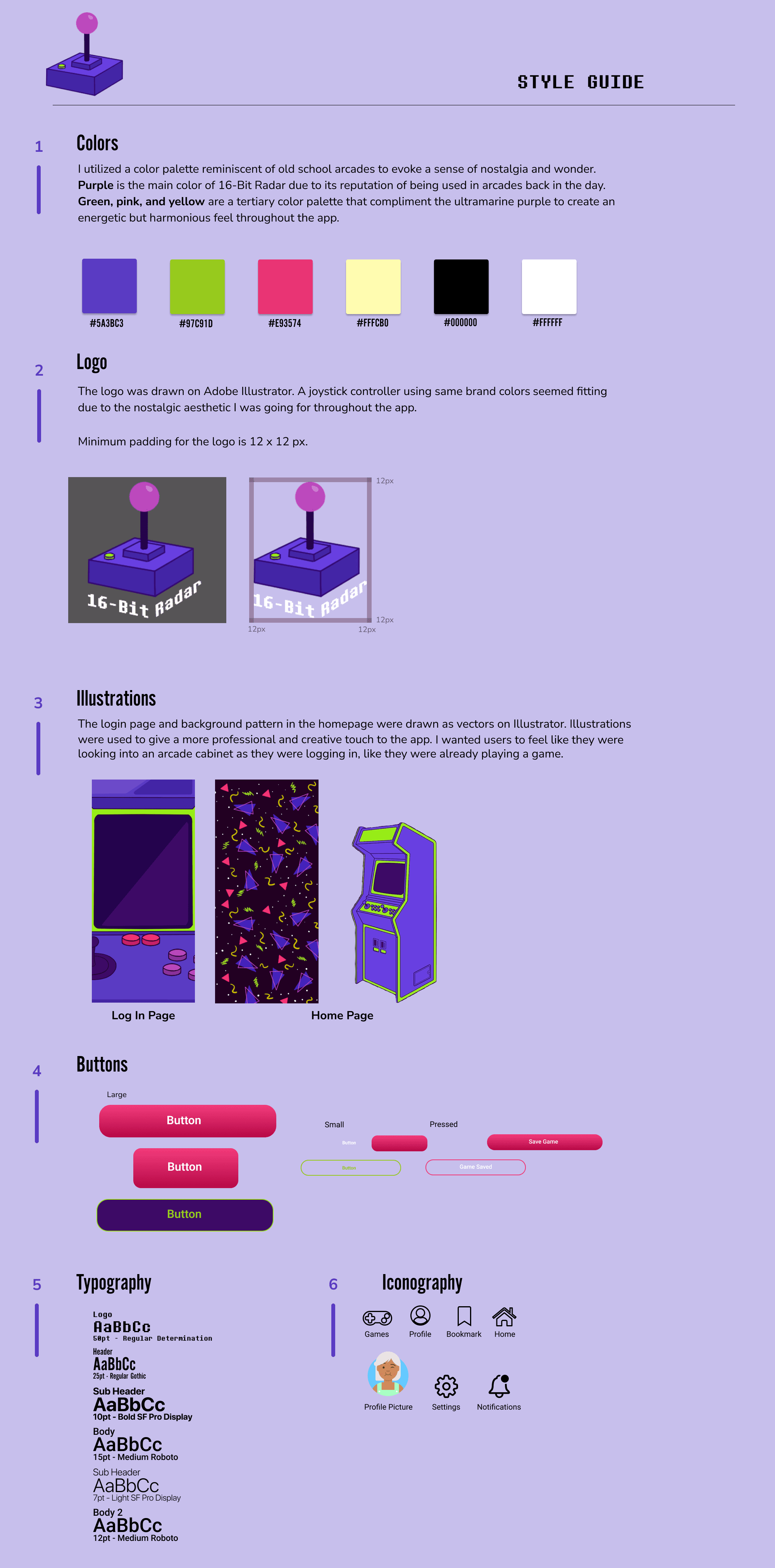
I wanted to delve into the aesthetic I was going for in my wireframes: bright, inviting colors with a quirky font and hand drawn UI elements to stand out from the competition.
Delving Into Aesthetics
I wanted to delve into the aesthetic I was going for in my wireframes: bright, inviting colors with a quirky font and hand drawn UI elements to stand out from the competition.
Creating an Account/Logging In
Using the app, users can create and log in to their account. After the user saves enough games to their library, the app starts to recommend games that align with the user’s preferences.
In the user’s profile page, it shows the user’s most played games as well as a summary that the user can create.
The user can also review any game as well as look through other player’s reviews.
Creating an Account/Logging In
Using the app, users can create and log in to their account. After the user saves enough games to their library, the app starts to recommend games that align with the user’s preferences.
In the user’s profile page, it shows the user’s most played games as well as a summary that the user can create.
The user can also review any game as well as look through other player’s reviews.
Creating an Account/Logging In
Using the app, users can create and log in to their account. After the user saves enough games to their library, the app starts to recommend games that align with the user’s preferences.
In the user’s profile page, it shows the user’s most played games as well as a summary that the user can create.
The user can also review any game as well as look through other player’s reviews.
Inquiring About an Animal
After logging in, the user is able to start an inquiry about any animal of their choice before adopting them.
Petbound lets the user browse through different animals and inquire to their respective shelter about any information not present in the pet’s bio. Petbound sends a transcript of the inquiry to the email connected to the user’s account.
Browsing for Games/Saving into Your Library
After logging in, the user can browse games located in 16-Bit Arcade and add them to their library to look at later.
The games are separated into genres, and have information of where exactly each game is located: as well as price, languages, a summary, and a trailer.
Inquiring About an Animal
After logging in, the user is able to start an inquiry about any animal of their choice before adopting them.
Petbound lets the user browse through different animals and inquire to their respective shelter about any information not present in the pet’s bio. Petbound sends a transcript of the inquiry to the email connected to the user’s account.
Browsing for Games/Saving into Your Library
After logging in, the user can browse games located in 16-Bit Arcade and add them to their library to look at later. The games are separated into genres, and have information of where exactly each game is located: as well as price, languages, a summary, and a trailer.
Inquiring About an Animal
After logging in, the user is able to start an inquiry about any animal of their choice before adopting them.
Petbound lets the user browse through different animals and inquire to their respective shelter about any information not present in the pet’s bio. Petbound sends a transcript of the inquiry to the email connected to the user’s account.
Browsing for Games/Saving into Your Library
After logging in, the user can browse games located in 16-Bit Arcade and add them to their library to look at later. The games are separated into genres, and have information of where exactly each game is located: as well as price, languages, a summary, and a trailer.
Final Reflections
Accessibility
Every game is going to be labeled so as to make it easy for screen reading technologies. The app will have a dark and light mode option, as well as several language options that aren’t just English. In the future, I want to collaborate with people with disabilities to provide better accessibility, since arcades aren't really known for being accessible.
What did I learn from 16-Bit Radar?
16-Bit Radar was the first project I worked on in the Google UX Certificate Program. I learned a lot about UX research and design, and working with programs like Figma and Miro for the first time was enjoyable. The amount of research, files, and time I had to use before even starting the wireframes was a pleasant surprise since I enjoyed the research portion of this study a lot more than I thought I would.
With my background in design, I was excited to work on a style guide for this app, and using my previous background and new knowledge, creating 16-Bit Radar was a lot of fun. I relished the creative freedom I had in designing something completely new from scratch. This was a great first project, and I’m excited to do more in UX!
Final Reflections
Accessibility
Every game is going to be labeled so as to make it easy for screen reading technologies. The app will have a dark and light mode option, as well as several language options that aren’t just English. In the future, I want to collaborate with people with disabilities to provide better accessibility, since arcades aren't really known for being accessible.
What did I learn from 16-Bit Radar?
16-Bit Radar was the first project I worked on in the Google UX Certificate Program. I learned a lot about UX research and design, and working with programs like Figma and Miro for the first time was enjoyable. The amount of research, files, and time I had to use before even starting the wireframes was a pleasant surprise since I enjoyed the research portion of this study a lot more than I thought I would.
With my background in design, I was excited to work on a style guide for this app, and using my previous background and new knowledge, creating 16-Bit Radar was a lot of fun. I relished the creative freedom I had in designing something completely new from scratch. This was a great first project, and I’m excited to do more in UX!
Final Reflections
Accessibility
Every game is going to be labeled so as to make it easy for screen reading technologies. The app will have a dark and light mode option, as well as several language options that aren’t just English. In the future, I want to collaborate with people with disabilities to provide better accessibility, since arcades aren't really known for being accessible.
What did I learn from 16-Bit Radar?
16-Bit Radar was the first project I worked on in the Google UX Certificate Program. I learned a lot about UX research and design, and working with programs like Figma and Miro for the first time was enjoyable. The amount of research, files, and time I had to use before even starting the wireframes was a pleasant surprise since I enjoyed the research portion of this study a lot more than I thought I would.
With my background in design, I was excited to work on a style guide for this app, and using my previous background and new knowledge, creating 16-Bit Radar was a lot of fun. I relished the creative freedom I had in designing something completely new from scratch. This was a great first project, and I’m excited to do more in UX!
Iteration 1:
Almost all users were confused about what the buttons on the top screen were meant for. They didn’t like how cluttered the screen looked, and they also didn't understand the purpose of pressing the tab in the middle.
Solution:
I made sure to label the tab and clear out any buttons that weren’t needed on the home screen to make the app easier to understand at first glance.

Iteration 2:
At first appearance, users don't recognize the 'save state' screen. Rather, they presumed the screen meant 'adopting' a pet. This caused confusion since they were promised initially to pick an animal at a different time.
Solution:
I made the starting screen clearly indicate that users are picking a save file, not adopting a pet

Iteration 1:
Almost all users were confused about what the buttons on the top screen were meant for. They didn’t like how cluttered the screen looked, and they also didn't understand the purpose of pressing the tab in the middle.
Solution:
I made sure to label the tab and clear out any buttons that weren’t needed on the home screen to make the app easier to understand at first glance.
Iteration 2:
At first appearance, users don't recognize the 'save state' screen. Rather, they presumed the screen meant 'adopting' a pet. This caused confusion since they were promised initially to pick an animal at a different time.
Solution:
I made the starting screen clearly indicate that users are picking a save file, not adopting a pet.

Iteration 3:
Some users were confused about what “taking a break” and “ending work” meant. Many of them assumed they had the same effect and ended up in a loop. This caused enough confusion that they assumed the prototype was glitched.
Solution:
I clarified the wording on both buttons, so users can understand which button did what action.
Feed Yourself and Your Pet
When you eat, you can feed your pet at the same time. Set a timer for the length of your meal. As the timer runs, your pet’s hunger meter will increase. Longer meals result in a fuller pet.
Sweet Dreams
Before going to bed, put your pet to sleep with you. Select the Nap option and choose the number of hours your pet should sleep. Your pet will rest for the selected time.
Time to Play
If you are going out or need time to study, take your pet with you. Choose an activity that fits your schedule, add breaks if needed, and allow your pet to play with a friend while you are busy.
Feed Yourself and Your Pet
When you eat, you can feed your pet at the same time. Set a timer for the length of your meal. As the timer runs, your pet’s hunger meter will increase. Longer meals result in a fuller pet.
Sweet Dreams
Before going to bed, put your pet to sleep with you. Select the Nap option and choose the number of hours your pet should sleep. Your pet will rest for the selected time.
Time to Play
If you are going out or need time to study, take your pet with you. Choose an activity that fits your schedule, add breaks if needed, and allow your pet to play with a friend while you are busy.
Feed Yourself and Your Pet
When you eat, you can feed your pet at the same time. Set a timer for the length of your meal. As the timer runs, your pet’s hunger meter will increase. Longer meals result in a fuller pet.
Sweet Dreams
Before going to bed, put your pet to sleep with you. Select the Nap option and choose the number of hours your pet should sleep. Your pet will rest for the selected time.
Time to Play
If you are going out or need time to study, take your pet with you. Choose an activity that fits your schedule, add breaks if needed, and allow your pet to play with a friend while you are busy.
Iteration 1:
Almost all users were confused about what the buttons on the top screen were used for. They didn’t like how cluttered the screen looked, and they also didn't understand the purpose of pressing the tab in the middle.
Solution:
I made sure to label the tab and clear out any buttons that weren’t needed on the home screen to make the app easier to understand at first glance.
Iteration 2:
At first appearance, users don't recognize the 'save state' screen. Rather, they presumed the screen meant 'adopting' a pet. This caused confusion since they were promised initially to pick an animal at a different time.
Solution:
I made the starting screen clearly indicate that users are picking a save file, not adopting a pet

Iteration 3:
Some users were confused about what “taking a break” and “ending work” meant. Many of them assumed they had the same effect and ended up in a loop. This caused enough confusion that they assumed the prototype was glitched.
Solution:
I clarified the wording on both buttons, so users can understand which button did what action.
Iteration 3:
Some users were confused about what “taking a break” and “ending work” meant. Many of them assumed they had the same effect and ended up in a loop. This caused enough confusion that they assumed the prototype was glitched.
Solution:
I clarified the wording on both buttons, so users can understand which button did what action.